
Handbook, stop one
Opening an AnovaBuy account and wallet
The register form, the code that sometimes hides in spam, the wallet in your own currency, and the welcome coupons.
The register screen, field by field
One minute, says AnovaBuy's registration article, and the form bears that out. On October 23, 2026 it had six parts; fill them top to bottom:
- Enter email address. Use an address you read every day. Order notices, storage reminders and refund messages go there.
- Enter password and Confirm password. Nothing unusual.
- Invite code (optional). Leave it blank unless someone gave you their code. Under AnovaBuy's affiliate rules, the person whose code you use earns a share when your parcels ship.
- Enter verification code with the Get Code button beside it. Press the button, then fetch the code from your inbox.
- The box for I have read and agree to the User Agreement and Privacy Policy. Both are links worth opening once before you tick.
- The yellow Register button.
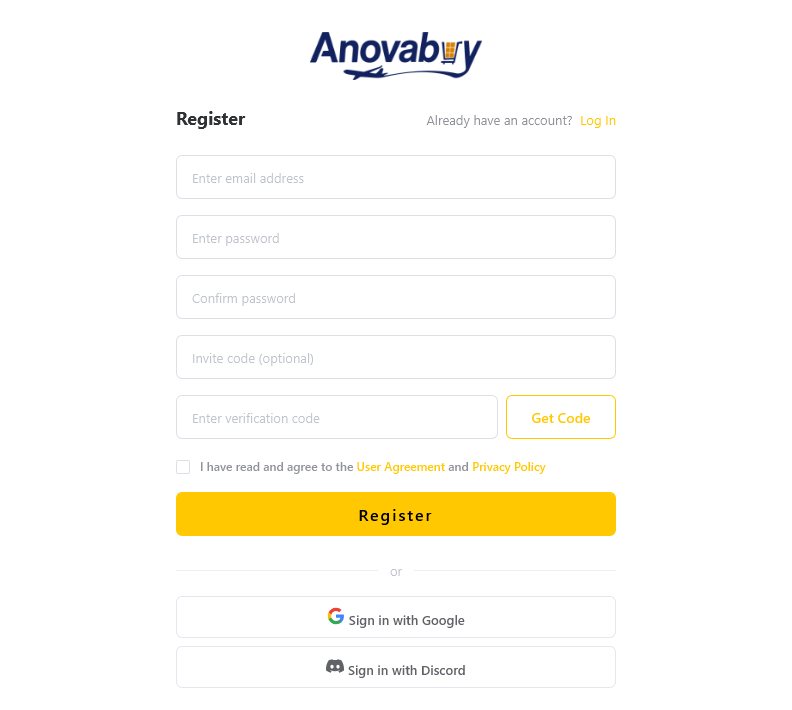
If you already sit in AnovaBuy's Discord server, the Discord button saves typing. Either way you end up with the same user center.
Finding the Sign Up button
On the current homepage the button is a dark pill at the far right of the yellow menu bar, next to Log In. The help article still shows the older layout, where Sign Up was an orange button on a dark photo, with a red arrow and the words "click here". If a guide or video you are following looks like the older picture, nothing is wrong; the site was redesigned.

Officially there are only two steps: the Sign Up button in the homepage's top right corner, then the form it opens. Everything else on this page is what we would check around those two steps.
When the code does not arrive
AnovaBuy lists three causes and we have nothing to add to them except order. Check the address first, because a typo there means waiting for something that was never sent.

If none of the three works, the published support address is [email protected], and a live chat bubble sat in the lower right corner of every AnovaBuy page we captured.
Wallet, currency and welcome coupons
Money sits in an AnovaBuy balance. To add some, the Recharge article sends you through the personal center to My Assets and then Recharge, where you type an amount and choose how to pay. Topping up is optional, because checkout also takes direct payment; the official checkout picture shows the balance as one option among several.
The homepage has an English / USD switch next to the cart. Prices are set in yuan by the sellers, and AnovaBuy shows a converted figure beside them, such as ¥103.00 ≈ $14.32 on the product page in its own guide. Keep the yuan figure in mind: coupons and value-added services are priced in yuan too.

Read those thresholds before getting excited. A USD 400 bundle made of large-threshold coupons is worth very little on a CNY 300 starter order. The smallest coupon is the one most first orders can use.
Affiliate tiers and the VIP card can wait
Two account features are easy to click into and safe to ignore on a first run. Every registered user counts as an affiliate under AnovaBuy's rules, with a commission rate that grows with the shipping volume of people you refer. A paid VIP card, sold as a half-year or yearly plan, also appears in the account area. We have not bought one and cannot say whether it pays for itself.

This site has no AnovaBuy invite code, so the links here earn us nothing from that program.
Account checks, all five
Tick these on the way through. They are saved in your browser and show up again on the tools page.
Account
Before you press Register