
Handbook, stops two and three
Link pasted, options picked, AnovaBuy order paid
Paste a link or search by keyword, read the product page properly, then go through Confirm Order line by line before paying.
Pasted link versus typed keyword
AnovaBuy's guide offers a link route and a keyword route. Route one: copy the address of a Taobao, Tmall or 1688 product (a friend's link works too) and drop it into AnovaBuy's search field. Route two: describe the product in words and browse what comes back. The guide claims AnovaBuy can read 99 percent of product information from those three platforms.
Keyword search on the current site returns results from 1688 by default, with a Taobao switch beside it. When we searched "hoodie" on October 23, 2026, the first screen held ten listings, all marked 1688. A note above the results says that searching means you agree to the Search Terms of Service.

Plenty of our shelf links lead to Weidian shops, a platform AnovaBuy's examples leave out. So a pasted Weidian link is an experiment: if the product page fills in with options and a price, carry on; if it does not, the Custom Order menu is AnovaBuy's route for goods that need special handling.
Reading the product page
The example in the official guide is a pair of wide-leg trousers, and it shows every field worth a second look:
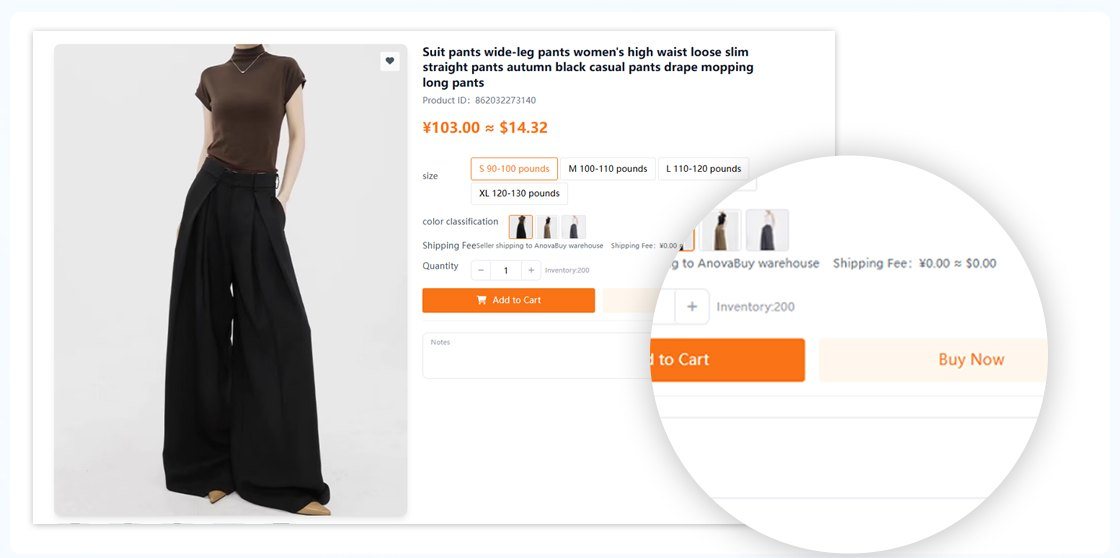
- Product ID (862032273140 in the example). Compare it with the listing you copied; a wrong paste brings up another item.
- Price, shown as ¥103.00 ≈ $14.32. The yuan figure is the seller's; the dollar figure is AnovaBuy's conversion.
- Size options read "S 90-100 pounds" through "XL 120-130 pounds". That is body weight, not a garment measurement. Many Chinese sellers size this way, sometimes in jin (half a kilogram) rather than pounds.
- Colour classification is a strip of photos. Choose by picture; the names are often numbers.
- Shipping Fee, "Seller shipping to AnovaBuy warehouse", here ¥0.00. When it is not zero, it is part of your first payment.
- Inventory (200 here). AnovaBuy's out-of-stock article says the number can be wrong, because some sellers rarely update it.
- Notes. Write what the buyer should check with the seller, briefly. "Chest 56 cm flat, please confirm" works better than a paragraph.
Confirm Order, read from the destination box down
Add to Cart or Buy Now takes you to Confirm Order. This is the screen that decides your first payment, and the one we would read slowest.
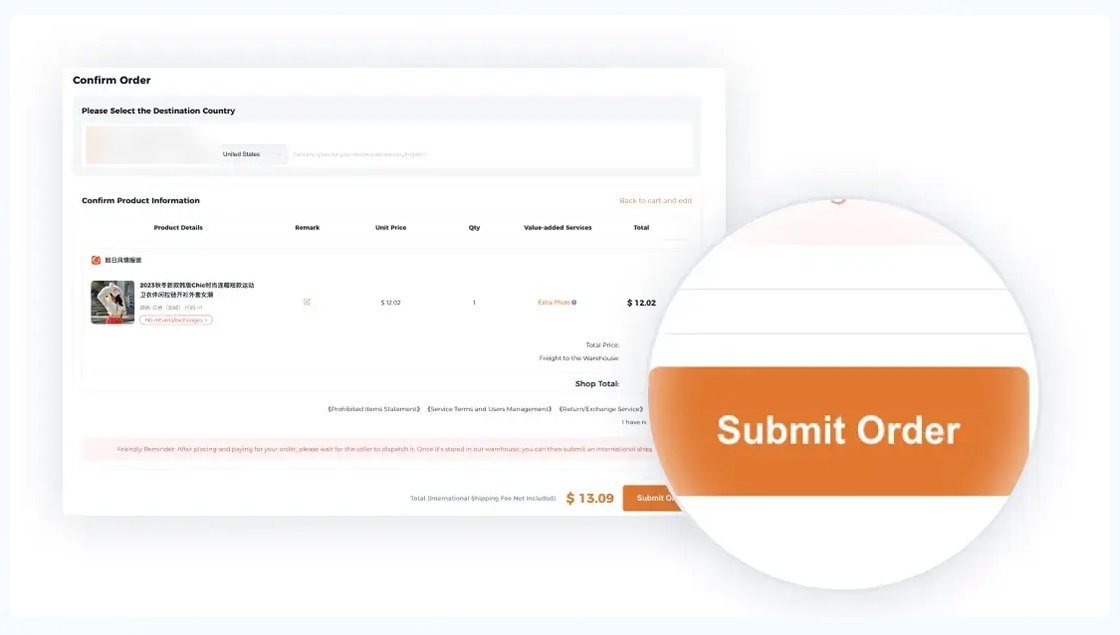
- Please Select the Destination Country. Pick where the parcel will go. It shapes the shipping lines you are offered later.
- Remark beside each product. A second place for notes.
- Value-added Services with an Extra Photo option. Detailed photos cost CNY 1 each, ordered here or after the goods arrive.
- Freight to the Warehouse and Shop Total. The domestic courier, per shop.
- A line of agreements: Prohibited Items Statement, Service Terms and Users Management, Return/Exchange Service.
- Total (International Shipping Fee Not Included), $13.09 in the example, beside Submit Order.
Look for a service fee row. One help article sets the purchasing service fee at 6 percent of the product amount; another, Preparation Before Purchasing, promises zero. Whatever your screen shows is what you will pay.
Settling the goods payment before the pay-by clock
After Submit Order you get a checkout with a deadline: "Please pay before" a date and time, "or it will be cancelled". The tips under step 3 of the official guide say several currencies are accepted and name credit card, WeChat, Alipay and PayPal.

Note the Stripe line: settlement is in euros, and your bank may convert again if your card is in another currency. If that matters, compare it with topping up the balance by another method and paying from there.
The status ladder an order line climbs
Once paid, each product line moves through statuses that AnovaBuy defines in its Order Status Description article. Knowing them tells you when you can still cancel and when the goods can join a parcel.

Two more can appear: Refund Successful after a refund request goes through, and Invalid Order when you cancel before paying. If a seller raises the price after you ordered, usually for extra domestic shipping, AnovaBuy asks for a top-up on the order page; see what changed before you pay it.
Product page and Confirm Order checks
Product page
Before you press Add to Cart
Confirm Order
Before you press Submit Order